AI evolved new tricks and skills since this thread was last pinged.
Some of those skills are combining in “multi-modal” models.
What new AI tricks have you tried in AWES?
Anthropic Claude is now waay more performant than ChatGPT
Perplexity gives you waay better Retrieval Augmented Generation search (e.g. it attributes links to primary source material inside chat responses)
These primary sources can now be further queried in tools like
Google Notebook LM or GitHub CoPilot. These allow you to load up source research material PDF’s, Websites, etc and get insights , storylines, themes, indexes… or just query deeper aspects of relatable specifics… Very handy
Also if you want to peer behind the curtains and look into @rschmehl 's brain
You can use the like of Infranodus to
analyse the auto generated captioning on his youtube videos and see how his brain was wired when he gave the presentation advising on how to revise to pass an Airborne Wind Energy Course exam
Before I share the link here Roland… Is that course shared publicly?
AI has made AWES slogans for investors and public support but on the more tech oriented side…
I’m still waiting to see the geometry gyms and mechanics solvers evolve AWES solutions…
Enough waiting… I’m going to have to dive in soon
Just had Bloomberg TV running this morning.
The gist of the conversation I heard was:
Investors are beginning to question the AWE hype, wondering if it’s being way overrated and really as big of a “gamechanger” as the hype would suggest, anytime soon.
Had another play with an AI toy this morning
Got Claude “Computer Use” to fill a spreadsheet with an AWES component types hierarchy table
It went a bit meta echo chamber using a web browser to discuss with Claude from inside the docker container … but it did manage to export data back into the real computer world (? Assuming I’m not a simulation again)
The files it produced are hardly exhaustive (Only ~60 entries) but hmmmm
None of which is excellent but from barely any text description… not bad
It also read and referenced a bunch of sources like researchgate.net
eumetnet.eu
gopreflight.co.nz
The prompt if you’re interested was
Generate a technical info-graphic showing the workings of 3 Airborne Wind Energy Systems architectures. Rotary kite turbine with TRPT lines for groundgen, Yo-Yo pumping, and crosswind Flygen. Show 2 labeled views for each of the three AWES architectures (the 2 views should be aligned for wind from the left side and wind coming from viewers perspective e.g.viewer is upwind of the AWES looking downwind toward the AWES) use 3d models for the images. Show the paths the kites fly in each of the concepts. Use arrows showing the motion and callouts explaining the main operational parts and their purposes. Align as a 3x2 grid all the side winds and all the downwind images sharing the same grass horizon line and similar continuous sky
You’re asking it the biggest vaguest questions possible. That’s lazy and won’t work. Ask it small open questions and have it give you the sources. I used it to find a math concept I’d forgotten the name of and then have it point me to lectures on it for example. I still don’t know if it’s the concept I should be learning about, as I don’t think it’s used much. The lectures look good.
Thanks Windy
Yeah, it was a vague prompt in terms of AWES architecturing but well adhered to in terms of image structuring, labelling, formatting.
the point here wasn’t me looking for a particular diagram to use…
None of this would be helpful for a company developing
The point was to see how the overall schema would appear and how accurate or obviously wrong and alien the result would be…
You can see that marketers and non technical folks will start using this.
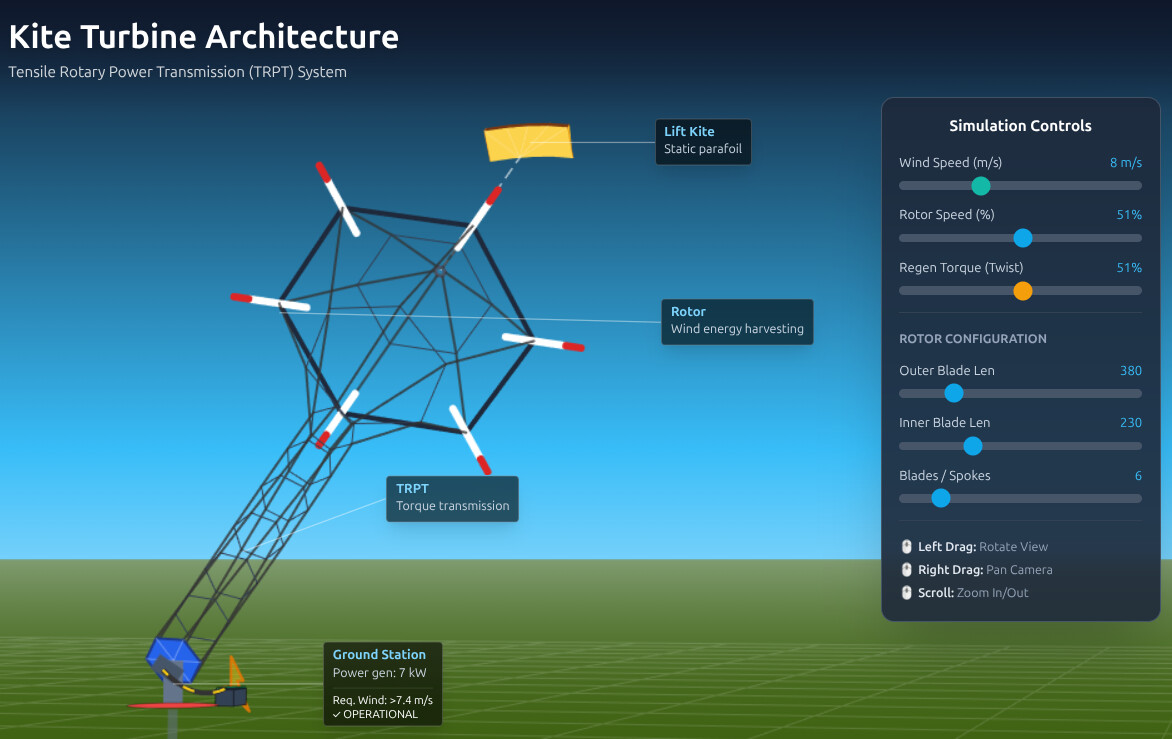
Similarly… interactive app animations like this take just seconds to create
vs the days it used to take me to design animate and render a set animation
one issue with this idea is how do you launch and land it - avoiding not only damage to the blades but also a messy entanglement of that many wires too.
Ohhh this is a lot more fun to play with now
There’s an overspeed control loss and stall and TRPT damage warnings
all the fun of the field without the splinters